Laptop customization has grown into a substantial market segment for e-commerce sellers, print-on-demand store owners, and corporate gift suppliers. Custom laptop skins offer customers a way to personalize their devices without permanent modifications, and UV DTF transfer technology makes producing custom laptop skins efficient, durable, and cost-effective at production scale.
As a factory-direct supplier specializing in UV DTF printing, we work with businesses worldwide to produce high-quality custom laptop skins that match their design requirements and quality standards. This guide covers everything procurement managers and business owners need to know about sourcing custom laptop skins using UV DTF transfer technology — from surface compatibility and durability to application methods and bulk ordering.
What Is UV DTF Transfer?
UV DTF (Direct to Film) is a digital printing method where UV-curable inks are printed onto a specialized PET film, then transferred onto hard surfaces using a pressure-sensitive adhesive layer. Unlike traditional vinyl cutting or screen printing, UV DTF printing preserves full-color detail, gradients, and fine text without requiring die-cutting or weeding. The result is a seamless transfer that bonds firmly to the target surface with high adhesion and scratch resistance. This technology is particularly well-suited for custom laptop skins because the thin film conforms to curved edges and maintains its appearance through daily use. Many wholesale buyers choose UV DTF transfer for laptop skins because of the production speed and consistent batch quality.
Why UV DTF Transfer for Custom Laptop Skins
When evaluating production methods for custom laptop skins, several factors matter to wholesale buyers: print speed, image quality, durability, and per-unit cost. UV DTF transfer delivers across all of these criteria.
Surface Compatibility
Laptop surfaces vary widely across manufacturers — brushed aluminum, anodized metal, matte plastic, glossy ABS, and carbon fiber composite. UV DTF transfers adhere reliably to all of these surfaces without specialized primers or pre-treatments. Our factory tests each production batch of custom laptop skins against a range of laptop materials to confirm consistent adhesion and peel strength before shipment.
Durability and Lifespan
Custom laptop skins produced with UV DTF transfer technology withstand the demands of daily use. The UV-cured ink layer resists scratching from keys, bags, and desk surfaces. The adhesive system is engineered to endure the heat generated during laptop operation — typically 35°C to 60°C on exterior panels. In our internal testing, properly applied UV DTF laptop skins maintain their appearance for 12 to 18 months of regular use. These custom laptop skins are also water-resistant, protecting against spills and humidity without edge lifting or delamination.
Full-Color Precision
Unlike single-color vinyl or limited-palette screen printing, UV DTF transfer prints in full CMYK plus white ink. This means your customers can order custom laptop skins with photographic images, brand logos, gradient backgrounds, or complex vector artwork — all at no additional setup cost per design. The 1440 dpi print resolution ensures fine details remain crisp even when scaled to fit larger laptop lids.
Application Guide for UV DTF Laptop Skins
One reason e-commerce sellers prefer custom laptop skins made with UV DTF transfer technology is the straightforward application process. With clear instructions included in each wholesale pack, your end customers can apply these laptop skins in under five minutes without specialized tools.
Step 1 — Clean the Surface. Wipe the laptop lid or palm rest area with a lint-free cloth and isopropyl alcohol (70% or higher). This removes oils, dust, and residue that could reduce adhesion. Allow the surface to dry completely before applying the custom laptop skin.
Step 2 — Peel and Position. Remove the release liner from the UV DTF transfer. Place the transfer film-side up on the laptop surface. The silicone release layer allows you to slide and adjust positioning before applying pressure.
Step 3 — Apply Firm Pressure. Using a squeegee or the edge of a rigid card, apply firm, even pressure from the center of the design outward. This forces out trapped air and ensures the adhesive bonds uniformly across the transfer.
Step 4 — Remove the PET Film. Slowly peel the top PET film back at a 180-degree angle. The UV-cured ink layer remains on the laptop surface. If any section lifts with the film, press it back down and repeat the peeling motion more slowly.
Step 5 — Final Press. Run the squeegee over the applied transfer once more to confirm full adhesion. The custom laptop skin is ready for immediate use.
The complete installation takes three to five minutes per laptop. For businesses that offer application services, a trained team member can complete 10 to 15 laptop installations per hour. This application speed is another reason UV DTF laptop skins are popular among e-commerce sellers.
Production Capacity and Bulk Ordering
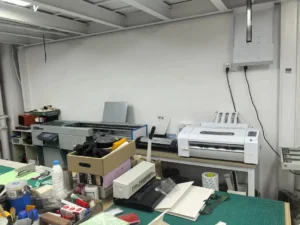
Our factory operates four UV DTF production lines with a combined daily output of over 5,000 A4-equivalent sheets. This capacity allows us to handle custom laptop skin orders from 50 units into the thousands without compromising turnaround time. Whether you need 100 units for a launch or 5,000 for a corporate client, our production team can deliver.
Each custom laptop skin order includes:
- Full CMYK plus white ink printing at 1440 dpi resolution
- Matte or gloss finish option on the protective topcoat
- Individual backing sheet on each transfer to prevent dust adhesion
- Bulk packaging (custom branded packaging available for 1,000+ unit orders)
- Application instruction cards in English included with each pack
We accept artwork in AI, PDF, PSD, PNG, and EPS formats. Our design team can prepare templates for popular laptop models — MacBook Air and Pro, Dell XPS, HP Spectre, Lenovo ThinkPad, and ASUS ZenBook — so you can offer model-specific custom laptop skins without additional design work. This template library covers over 60 laptop models from 12 to 17 inches.
For businesses that already carry our custom phone case decals and UV DTF water bottle stickers, adding custom laptop skins to your catalog requires no new equipment or training. The same UV DTF transfer technology applies across all these product categories, simplifying your supply chain. Your existing custom decal customers are natural buyers for laptop skins.
Pricing and MOQ Options
Our factory-direct pricing for custom laptop skins starts at competitive per-unit rates for orders of 50 pieces. As order volume increases, per-unit costs decrease through tiered pricing:
- 50–200 units — Entry-level wholesale pricing for custom laptop skins
- 200–1,000 units — Volume discount tier for laptop skins
- 1,000+ units — Bulk production pricing with maximum savings
We provide a free quote with no obligation — send us your artwork files and target quantity, and we will return a detailed price breakdown including shipping options within one business day.
Shipping and Delivery Times
We ship custom laptop skin orders to buyers in North America, Europe, Australia, and Southeast Asia via DHL, FedEx, and air freight. Standard delivery to most destinations takes 5 to 8 working days from dispatch. For bulk orders exceeding 5,000 units, sea freight options are available with extended lead times and reduced per-unit shipping costs.
Every shipment includes tracking and insurance. We handle customs documentation as part of our standard service, so your order clears inbound customs without complications. Our logistics team is experienced with shipping UV DTF products to over 30 countries.
Frequently Asked Questions
1. Will UV DTF laptop skins leave residue when removed?
Our UV DTF transfers use a pressure-sensitive adhesive system that bonds firmly during use but releases cleanly when peeled off. When removed properly — lifting from a corner at a low angle — the transfer leaves no adhesive residue on the laptop surface.
2. Can you print custom laptop skins for models not in your template library?
Yes. We can create templates for any laptop model as long as you provide accurate dimensions or a DXF template. We maintain a library of templates for over 60 laptop models from 12 to 17 inches. If your target model is not in our library, we can produce a custom template within one to two working days at no extra charge.
3. What is the minimum order quantity for custom laptop skin designs?
Our standard MOQ is 50 units per design. For multi-design orders — different artwork on the same laptop model — we can accommodate mixed production within a single batch. Contact our team to discuss flexible options.
4. How should I store bulk UV DTF laptop skin transfers before selling them?
Store transfers flat in a cool, dry environment between 15°C and 30°C with humidity below 60%. Keep them away from direct sunlight and heat sources. When stored properly, our UV DTF transfers have a shelf life of 12 months from the production date.
5. Do you offer sample packs before I commit to a bulk order?
Yes. We provide sample sheets of our UV DTF transfer material for a nominal fee, which is credited toward your first bulk order. Samples include both matte and gloss finish options so you can evaluate print quality, adhesion, and durability before placing a larger production run.
Ready to take your product line to the next level? Contact UV DTF Decor today to discuss your custom transfer requirements and request a free quote.